
‘Check Your Work’ Doesn’t Work with LLMs
In my last post, I argued that the tools developers build for themselves keep showing up on everyone else’s desk eventually (eg, rsync ➡ Dropbox), so one of the best ways to understand how knowledge work will change tomorrow is to understand what developers are doing today.
One of the reasons using LLMs (and developers are using a lot of LLMs right now) feels so different from most of our experience interacting with computers is their ability to process normal human language. Just say “summarize this report into a 3-paragraph email I can send to my team” and that’s exactly what you get! While you could get more specific (“at least 2 paragraphs, but no more than 3, explain things in plain language like you would to a 5-year-old”) usually even a vague instruction gets at least passable results.
A few weeks ago I gave Claude an instruction like “draft an email summarizing our request and setting a deadline of next Tuesday”
Click. Whirr. And then I had a perfectly useful draft email for my purposes. I made some quick edits and off it went.
But then I looked closer at the (now sent) message and Claude had put in the wrong date (it was the correct date for that particular Tuesday – in last year 🤦♂️).
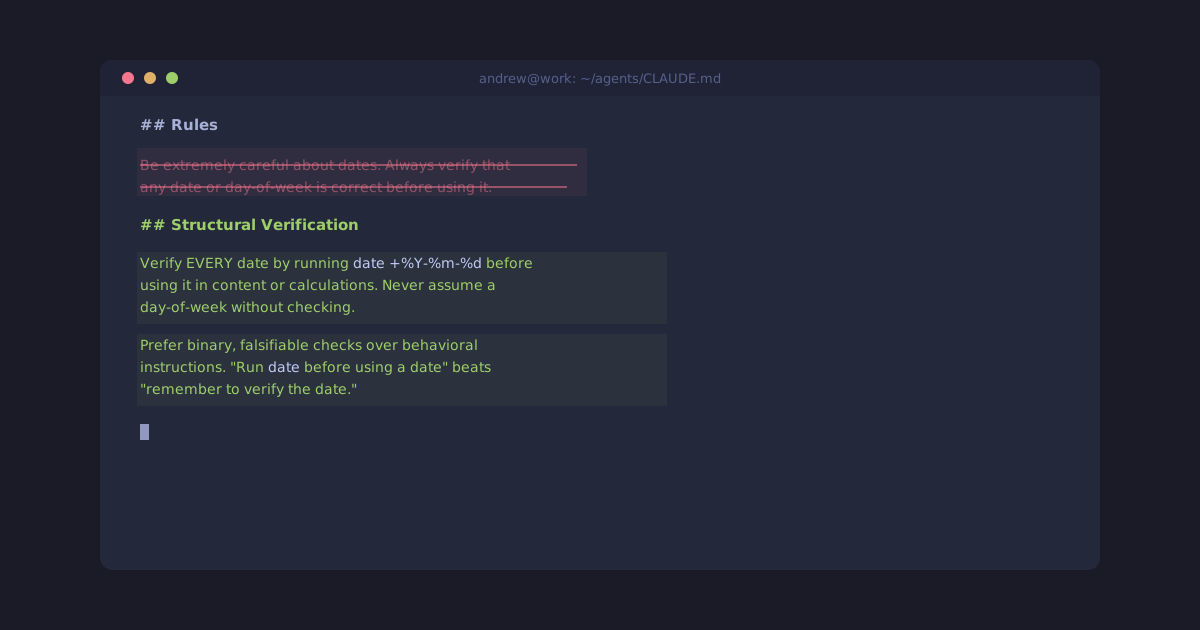
Of course Claude was “apologetic” when I pointed out the error. At first I tried to be more explicit: “Be very careful about dates”. I even added an extra instruction to be read before every session that said to be extremely careful about dates, and to double check them.
And it worked.
Or at least I thought so.
Until the next time it didn’t.
It turns out “check your work” is directionally helpful but not truly effective.
What does work is to give the LLM a test it can use to falsify a claim.
In this case, the fix was that instead of just telling Claude to “be sure about the date” I added an explicit instruction to verify EVERY relative date reference by checking it against the computer’s built-in date command.
The agent didn’t get “better at remembering to check its work on dates”, it changed the way it worked because the instructions were more specific about how to check its work – I gave it a falsifiable success condition.
Given the right guidance, the agent is perfectly capable of correcting its own mistakes before you ever see them, as long as you define what you’re asking for in a way that it can verify its own work.
But while we humans are quite good at knowing what “correct” means when we see it, in the context of knowledge work, most of us don’t have much experience systematizing those preferences into workflows a computer can reliably automate.
My friend and publishing industry veteran George Walkley posted recently about this from the other direction — publishers have the right editorial instincts but not the systems habit:
Editorial training optimises for polish and precision. [But t]here is also a difference between shaping sentences and thinking in systems. Developers tend to treat prompts as modular components, version-controlled assets, parts of repeatable workflows. Most publishers that I work with are not yet operating at that level of process abstraction.
Yet I’ve seen evidence that we’ve been able to bridge this gap in the past, and it offers useful insights for working with LLMs today.
Back in my own days in a book publishing Production Department, the work involved oodles of exacting criteria: Make sure every figure has a caption; Chapter titles can’t be more than 80 characters long; You can’t skip from H1 to H3 without an intervening H2.
The criteria were clear, but still often challenging for a person to test 100% correctly with dozens to review across hundreds of pages. Quite often the natural response to this was adding yet another review pass by another person applying the same criteria (“is this Proofread 1 or Proofread 2?”).
Computers were rarely looked to for help because the work to codify an ever-evolving list of criteria (often there were different checklists for different types of books too) was rarely worth the cost of having a developer build a program or script to do it.
A technique I borrowed from Rebecca Goldthwaite, then at Cengage, was something of a middle ground, which was to use an XML-validation tool called Schematron to tackle the problem. With Schematron, you created a list of falsifiable assertions about a piece of content, and the computer ran down the list (however long that list was) and merrily evaluated the content based on your assertions.
Although it didn’t require any formal programming knowledge to run those tests, it did mean learning a fairly arcane notation for translating a natural-language assertion like “every figure MUST be immediately followed by a caption” into a formal test the computer could perform.

But it was easy to swap out which checklist of assertions you used, and with a bit of practice, even an editor with no programming experience could learn to write and revise those tests, improving and adapting them over time.
In hindsight, this was one example of a bridge between a person using natural language to describe a problem, and expressing that problem in a consistent, verifiable way for a computer.
Because until very recently, to explain to a computer how to help us, we had to learn how to talk in ways that the computer could understand. While that was possible using a “real” computer language, it could also be done with tools like AppleScript, or even recording a “macro” for the computer to play back again, over and over.
Regardless of the tool, the challenge was the same: turn fuzzy natural language into unambiguous computer instructions.
The good news is that now LLMs can understand our fuzzier language directly, and then they turn that intention into practical actions you see happen on your screen.
But there’s a catch: because the agent seems to understand that fuzzy language, it’s easy to skip a critical step — ensuring clear verification criteria. Without it, the agent will go off and do the work as best it can, leaving you to spot incorrect dates, or note when it said one thing but actually did another.
The gap used to be comprehension: the computer couldn’t understand what we wanted, so we had to learn its language. Now it’s verification: the computer understands what we want but can’t confirm it delivered.
Humans have already developed very effective ways of coping with this problem. It’s why airline pilots who’ve flown the same type of planes for 20 years still follow pre-flight checklists. It’s the whole conceit behind The Checklist Manifesto: offload the burden of verification to externally defined criteria. “Are we ready to take off?” is a riskier question to ask than “Can you prove you completed every step in this checklist?”
When we wrote precise, pedantic instructions, ambiguity had nowhere to hide. Now the input is fuzzy and the output looks confident —which is exactly when wrong dates, false claims, and quiet mistakes slip through. Especially outside of coding, where there’s no test suite to catch them. The fix isn’t to hope the agent gets it right. It’s to tell the agent how to check.